

Description
Google Feed Manager for WooCommerce is a free WordPress plugin that creates compliant product feeds for Google Merchant Center. It supports 7 feed types including Primary, Supplemental, Promotions, and Local Inventory feeds. The plugin auto-maps required attributes, schedules automatic updates, and handles up to 100 products per feed. No coding required—generate your first Google Shopping feed in under 5 minutes.
This WooCommerce feed manager gets your products on Google Shopping—fast. Generate a compliant product feed, connect it to Google Merchant Center, and start appearing in shopping feeds where buyers are searching.
No XML. No spreadsheets. No developer.
The Hidden Cost of a Bad Product Feed
Every day without a working WooCommerce Google Shopping feed costs you sales. Your competitors are already there.
Here’s what most store owners don’t realize: 15–20% of WooCommerce products get rejected in Google Merchant Center due to small data errors. That means for every €100 in ad budget, €15–20 goes to “invisible” products that never show up. Without a proper Google feed, you’re paying for traffic you’ll never get.
And if you’ve tried creating a product feed manually? You know the pain:
– Rejected products with cryptic error messages
– Hours lost reformatting data fields
– Shopping feeds that break every time you update inventory
– The sinking feeling when “Disapproved” turns red in Merchant Center
Meanwhile, your competitors keep selling.
What If Your Google Merchant Feed Just Worked?
Imagine opening Google Merchant Center and seeing zero errors. Your products approved. Your ads running. Sales coming in while you sleep.
That’s not a fantasy. That’s what happens when your WooCommerce product feed is built right from the start.
We’ve spent years inside Google Merchant Center. We’ve fixed thousands of disapproved feeds. We’ve seen what works—and what doesn’t.
So we built the Google feed manager for WooCommerce we wished existed.
Documentation | Video Tutorials | FAQ | Support
See It In Action
3 Steps. 5 Minutes. Done.
- Pick your feed type – Primary, Supplemental, Promotions, Local Inventory, or 4 others
- Map your data – We auto-fill required fields; you customize what matters
- Generate – Copy your feed URL into Merchant Center
That’s it. No XML editing. No spreadsheet gymnastics. No developer needed.
Every Google Feed Type. One Plugin.
- Primary Feed – Your main product catalog
- Supplemental Feed – Override or add data to existing products
- Promotions Feed – Run sales and special offers
- Local Inventory Feed – Show in-store availability
- Manufacturer Center Feed – Brand-level product data
- Dynamic Remarketing Feed – Retarget past visitors
- Product Ratings Feed – Display star ratings in ads
Real Store Owners. Real Results.
“I started with the free version for Google Shopping. It worked. When I needed more feeds, I upgraded. Support responded in one business day, every time. Reliable plugin, reliable team.”
— @fredgerendasy“This plugin is essential for any shop that wants to be reliably listed by Google. It’s become a critical component of my business strategy.”
— @poissonvert
Built for Stores That Actually Sell
Industry research shows that only 5–10% of products in a typical catalog actually generate Shopping traffic. Google calls the rest “zombie products”—items in your feed that get zero impressions. The difference? Attribute-rich product data—what Google calls “Golden Records”—that algorithms can understand, match, and surface to buyers. Early data suggests these complete records see 3–4× more visibility in AI-driven shopping experiences.
Performance Prioritizing
Rank products automatically based on real WooCommerce sales data. Focus ad spend on items that actually convert. Assign performance tiers (high/mid/low) to Google custom labels and build smarter bidding strategies—no spreadsheets, no guesswork.
Filters that protect your margins
Exclude out-of-stock items. Hide low-margin products. Cut low-performers from your feed entirely. Only advertise what makes you money.
Scheduled updates
Your feed refreshes automatically. Merchant Center pulls the latest data. You don’t lift a finger.
Scales with you
10 products or 10,000—same speed, same reliability. Large catalogs run without slowing your site.
Plays nice with your stack
Works with Yoast, RankMath, WooCommerce Brands, Germanized, currency switchers, and more. Premium adds WPML, Polylang, and TranslatePress.
Developer-friendly
WordPress hooks let you customize any data field. No constraints, full control.
Built to Google’s specs
Strictly follows Google’s 2026 Merchant Center requirements and CSS guidelines. When Google updates their feed specifications, we update the plugin.
The Difference Between Free and Pro
Free includes:
– All 7 Google feed types
– Attribute mapping and edit rules
– Scheduled auto-updates
– Product filters
– Up to 100 products per feed
Pro unlocks:
– Unlimited products per feed
– Advanced filtering logic
– Full multilingual support (WPML, Polylang, TranslatePress)
– Multi-channel: Amazon, eBay, Facebook, Instagram, Pinterest, Etsy
Upgrade to Pro More products, more channels, more sales
External services
This plugin connects to wpmarketingrobot.com for two optional, admin-only features. All requests use HTTPS. No product, order, or customer data is sent.
1) Content check & featured image
– Purpose: Check if a new blog/vlog exists and fetch its featured image for the “Feed List” page in wp-admin.
– Data sent & when: On loading the “Feed List,” a GET request is made without PII. As with any web request, the remote server receives standard metadata (IP, user agent, referrer).
2) Google Shopping Checklist sign-up
– Purpose: Let an admin opt in to receive the Google Shopping Checklist via email.
– Data sent & when: Only on form submit: email, first name, last name. Used to deliver the checklist; every email includes an unsubscribe link.
Provider policies (wpmarketingrobot.com):
– Terms of Service
– Privacy Policy
Notes: These calls occur only in wp-admin for the features above. If you don’t use them, no form data is transmitted.
Screenshots
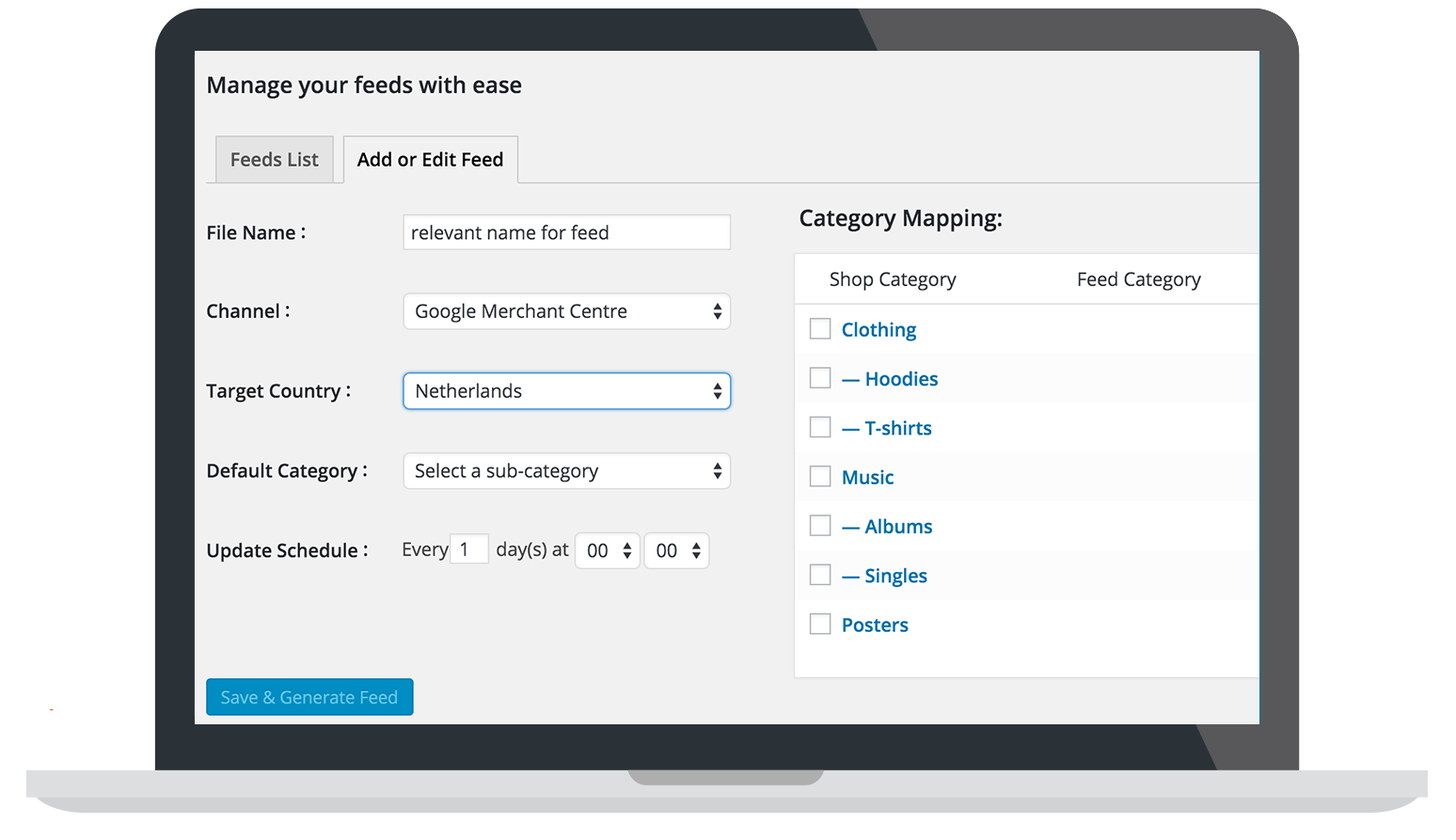
Add a new feed 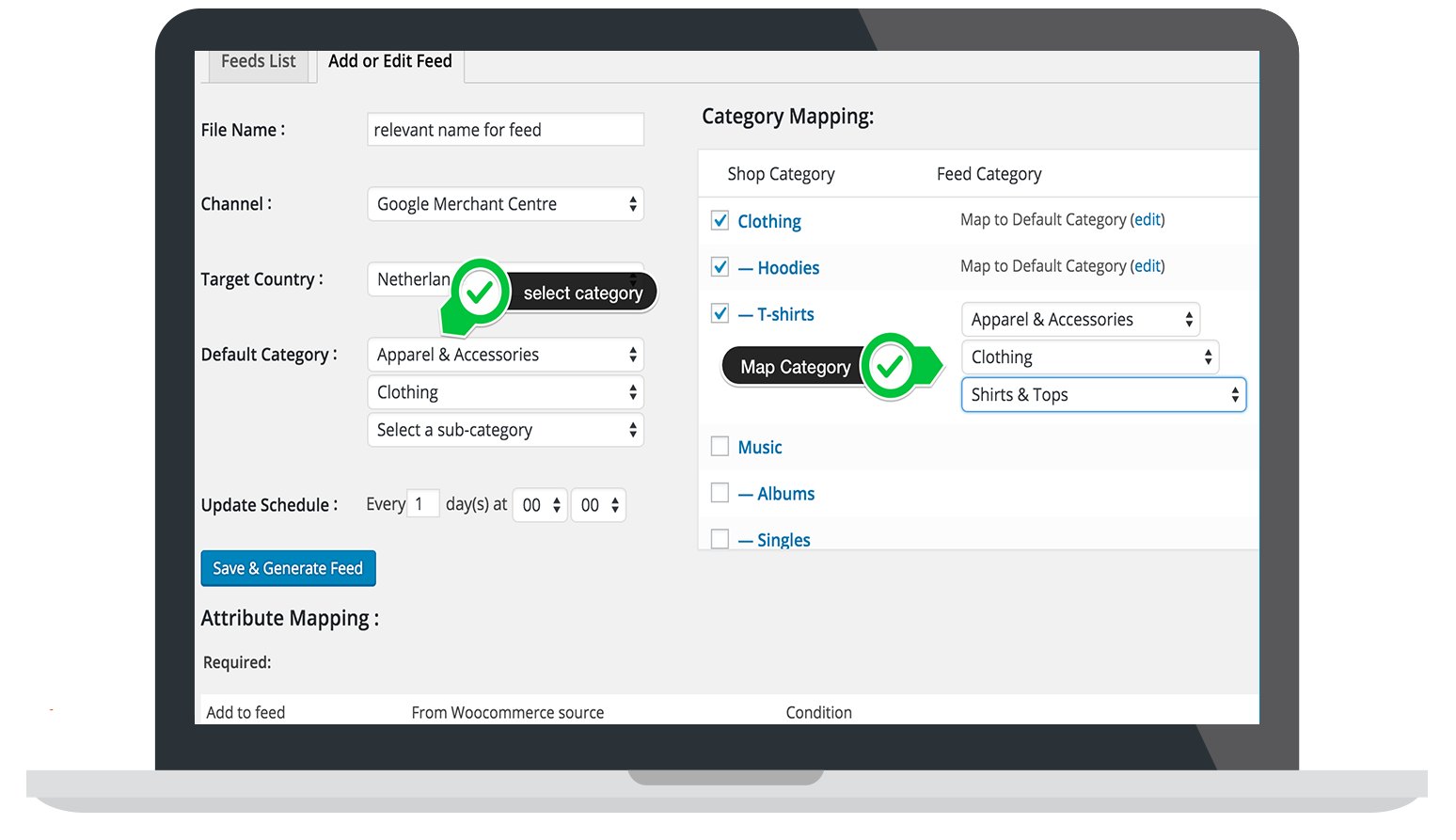
Map a category 
Installation
Under 2 minutes. No technical skills required.
From WordPress (Recommended)
- Go to Plugins Add New
- Search for “Google Feed Manager for WooCommerce”
- Click Install Now, then Activate
Done. Your first feed is 3 clicks away.
Manual Installation
- Upload the
wp-product-feed-managerfolder to/wp-content/plugins/ - Activate from Plugins page
Watch the Walkthrough
FAQ
-
How fast can I get my products on Google Shopping?
-
5 minutes from install to feed URL. Pick feed type, map attributes (we pre-fill the required ones), click Generate. Paste the URL into Merchant Center. Your products start syncing immediately.
-
Why this plugin instead of the dozens of others?
-
Built exclusively for Google. Not a multi-channel afterthought—a Google-first tool with:
– All 7 GMC feed types
– Precise attribute mapping with edit rules
– Filters that protect your ad spend
– Scheduled updates that just work
– Hooks for developers who need controlIt scales from 10 products to 10,000+ without slowing your site.
-
How do I connect WooCommerce to Google Merchant Center?
-
- Generate your feed in the plugin copy the feed URL
- In Merchant Center: Products Feeds Add choose Scheduled fetch
- Paste URL, set fetch frequency, save
- Verify your website domain if you haven’t already
First fetch happens within the hour. Check Diagnostics after—fix identifiers and category mapping first for the fastest approval.
-
Will my variable products and variations work?
-
Yes. All variations export with their own prices, images, and attributes. Custom fields (including ACF) map directly into feed attributes.
-
What if my products get disapproved?
-
Usually it’s missing identifiers (brand/GTIN/MPN) or category mapping. The plugin includes:
– Pre-populated required attributes
– Edit rules to transform data on the fly
– Filters to exclude products that shouldn’t advertiseFix identifiers first—they cause 60%+ of disapprovals.
-
Does the feed update automatically?
-
Yes. Set your schedule once. The plugin regenerates the feed; Merchant Center fetches it automatically. You don’t touch it again unless your product data structure changes.
Pro tip: On low-traffic sites, use a real server cron instead of WP-Cron for reliable timing.
-
Free vs Pro—what’s the real difference?
-
Free: Everything you need to run Google Shopping with up to 100 products per feed. All feed types, scheduling, mapping, filters.
Pro: Removes the 100-product cap. Adds advanced filters, multilingual support (WPML/Polylang/TranslatePress), and additional channels (Amazon, eBay, Facebook, Instagram, Pinterest, Etsy).
Most stores start free. Upgrade when you hit the cap or need more channels.
-
Something’s not working. What do I do?
-
- Update WordPress, WooCommerce, and the plugin to latest versions
- Check PHP 7.4+ and memory limit (256MB minimum, 512MB+ for large catalogs)
- Deactivate/reactivate the plugin
- If stuck: check documentation or open a support ticket
We respond within 1 business day.
Reviews


Contributors & Developers
“WPMR Google Feed Manager for WooCommerce – Sell on Google Merchant Center & Shopping” is open source software. The following people have contributed to this plugin.
Contributors


“WPMR Google Feed Manager for WooCommerce – Sell on Google Merchant Center & Shopping” has been translated into 2 locales. Thank you to the translators for their contributions.
Interested in development?
Browse the code, check out the SVN repository, or subscribe to the development log by RSS.
Changelog
2.22.0 2026-03-30
Fix – When making a new feed the product performance data selector would not work correctly.
Tweak – Hardened the failed feed trigger to prevent unnecessary emails reporting a failed automatic feed process
Added – Added a ‘Product Category primary’ source
2.21.0 2026-03-16
Added – Added the option to use Performance Prioritization in your feeds
Tested – Tested up to WooCommerce 10.6.1
Tweak – Updated the cron trigger that checks for feeds in the auto update queue from every hour to every five minutes
Fix – Fixed an issue where a feed with an extreme number of filtered out products would fail due to the feed not being updated for several minutes
Fix – Fixed an issue that caused the “View Feed” button to only open .xml feeds
Tweak – Added the option to include product performance data to the feed
Tweak – Made some small positional improvements on the Product Feed Editor page
Tweak – Improved the queries that are used when loading the Product Feed Editor page
2.20.1 2026-02-24
Tested – Tested up to WooCommerce 10.5.2.
Fix – Re-minified the JavaScript files to fix an issue with the Settings page.
Fix – Fixed an issue where batches could mix together when updating multiple feeds at once.
2.20.0 2026-02-02
Tested – Tested up to WooCommerce 10.4.3.
Tweak – Improved the reliability of sending an email to the user after an automatic feed update fails.
Tweak – Made changes in how the plugin identifies the WordPress uploads folder.
2.19.0 2025-16-12
Fix – Changed the implementation of the running dots during a feed generation process, so it runs on more browsers
Tweak – Hardened the feed generation completed functionality to improve handling multiple feeds at once
Tested – Tested up to WooCommerce 10.4.2.
2.18.0 2025-24-11
Tweak – Made some important improvements to the multi-feed management process.
Tweak – Made some improvements to the robustness of the cleanup process after a feed failure.
Tested – Tested up to WooCommerce 10.3.5.
Fixed – Fixed an issue with the recalculation of tax prices.
2.17.0 2025-04-11
Fix – Fixed an issue using the edit value option could not be used to remove the # symbol from a string.
Tweak – Improved the resource usage of the feed generation process.
Tweak – Corrected the way the directories are located.
Tweak – Improved the code compliance with WordPress rules.
Tested – Tested up to WooCommerce 10.3.1.
2.16.3 2025-03-11
Fix – Fixed an issue using the edit value option could not be used to remove the # symbol from a string.
Tweak – Made several changes to the plugin to comply with WordPress standards.
2.16.2 2025-27-10
Fix – Fixed a deploy error.
2.16.0 2025-17-10
Fix – Fixed an issue with the Edit action link in the Feed List, for feeds that where in the process of regenerating.
Fix – Improved the code to work in a Bedrock WP environment.
Tweak – Improved the feed generation process on several points.
Tweak – Improved the feed generation messaging.
2.15.2 2025-16-09
Fix – Reminified the wppfm_feed-form.js and wppfm_setting-form.js files to fix possible compatibility issues.
2.15.1 2025-04-09
Tested – Tested up to WooCommerce 10.1.2.
Fix – Replaced getmypid() and posix_kill() usage with session-based process identification to ensure compatibility with Kinsta hosting restrictions.
2.15.0 2025-22-08
- Tested – Tested up to WooCommerce 10.1.1.
- Added – Added a Low Stock Amount source to the source list.
- Fix – Fixed an issue with some Google Product Categories not showing the second level categories.
- Tweak – Improved the process that blocks a feed generation in progress to prevent two processes to run simultaneously.
2.14.0 2025-04-13
- Tested – Tested up to WooCommerce 9.8.1.
- Added – Added a direct link to the latest weblog about improving your ECommerce skills.
- Added – Added the option to revert back to a previous version of the plugin in case of issues after installing en update.
- Added – Added a Join our Facebook page card to the Support page.
- Tweak – Optimized function comments on several functions.
- Tweak – Improved the handling of a failure to initialize the wp_filesystem.
- Tweak – Significantly updated the feed process initiation process.
2.13.0 2025-02-18
- Fix – Fixed an issue that prevented the plugins product identifiers for product variations to be saved to the database.
- Tweak – Further improved the feed process logger.
- Tested – Tested up to WooCommerce 9.6.1.
- Added – Added the new WooCommerce GTIN, UPC, EAN or ISBN product identifier as a source to the source selector.
2.12.0 2024-12-23
- Tweak – Moved the product identifiers from the Products Inventory tab to the Product Feed tab.
- Fixed – Fixed an issue where the WPML Language Selector, the Currency selectors of the FOX Currency Switcher, the Polylang Language Selector the Transpress Language Selector would not show up anymore.
- Tweak – Made several code improvements en did some code cleanup.
- Tested – Tested up to WooCommerce 9.5.1
- Added – Added the Omit price filter option to give users the option to switch off third party filters that could influence prices in the feeds.
2.11.2 2024-11-30
- Added – Added an option to export existing backup files from the Settings page.
- Fixed – Fixed a function name that had no prefix and could therefor cause a duplicate function conflict.
2.11.1 2024-11-14
- Tweak – Changed the subscribe for free message to a pop-up screen
- Tweak – Delayed loading the translations to the moment the after_setup_theme hook is triggered, to prevent a warning.
- Tweak – Updated the way the subscribe for free form to a get a free ebook form
- Tested – Tested up to WordPress 6.7
- Tested – Tested up to WooCommerce 9.4.1
2.11.0 2024-11-11
- Fixed – Fix an issue causing the WooCommerce source selector in a new optional attribute line would not convert to a Select2 selector.
- Fixed – Fix an issue that could cause the plugin to get stuck in thinking a feed regeneration is in progress, even if its not. This prevented new feeds to regenerate.
- Update – Converted the feed filter Source selector to a Select2 selector
- Update – Improved the error, warning, info and success message handling
- Update – Added the option to exclude single products from a feed, from the Edit Product page
- Update – Added the option to use shortcodes in the Google Campaign URL Builder
- Tweak – Reformatted and cleaned up a large part of the code
- Tweak – Only show the Brand, GTIN and MPN sources in the WooCommerce source selectors when the “Show product identifiers” option on the Settings page is selected
- Tweak – Tested up to WooCommerce 9.3.3
2.10.0 2024-08-28
- Fixed – Some Google Analytics fields would not read their stored settings from the database
- Fixed – Google Analytics field data would not be transferred to feed duplicate
- Tweak – Tested up to WooCommerce 9.2.3
- Update – Added the Certification details parameters to the Google Channel attributes
2.9.0 2024-08-19
- Fixed – Fix an issue with renaming existing feeds
- Fixed – Fix an issue that would cause some money value recalculations to fail to round correctly
- Tweak – Tested up to WordPress 6.6.x
- Tweak – Changed the remote HTTP requests to improve plugin security
- Tweak – Added some extra test points to the feed processing logging code
- Tweak – Tested up to WooCommerce 9.1.4
2.8.0 2024-07-15
- Fixed – Fix an issue where the Google Analytics data on an existing feed would not get the correct default values
- Fixed – Fix an issue with changing the feed name of an existing feed
- Fixed – Fix an issue with an incorrect handling of multiple product_details attributes
- Fixed – Fix an issue where under some conditions a change of a change value would not store correctly
- Fixed – Fix an issue where the target country of an existing feed could not be changed
- Tweak – Tested up to WooCommerce 9.1.2
- Tweak – Implemented a correction on the format in which the material and color attributes are placed in an xml feed
2.7.1 – 30/05/2024
- Fixed an issue where the Edit Feed page would not load and showed an error
2.7.0 – 27/05/2024
- Tested on WooCommerce 8.9.1
- Fixed the missing feed item type in the “feed ready” message
- Fixed the incorrect feed specifications link when making a new Supplemental feed
- Improved the Source and Query selectors by implementing the Select2 selector elements
- Added a progress bar to the Feed Editor form that shows the progress of a feed update
- Added the option to include Google Analytics data to the product urls in the feed
2.6.0 – 15/04/2024
- Fixed an issue where the Name and Updated columns in the Feed List would not be sortable when WP was set to another language than English
- Tested on WordPress 6.5
- Code cleanup performed
- Fixed an issue with the “Clear feed process” button
- Fixed the line-up of some selectors in the attribute mapping element
2.5.2 – 26/03/2024
- Fixed an issue that prevented the user from canceling the Easter Promotion message.
2.5.1 – 21/03/2024
Fixed an issue with a folder name with a capital letter that would cause error messages on surtain systems
2.5.0 – 20/03/2024
- Fixed a “Creation of dynamic property is deprecated” error logging message
- Fixed an issue that would prevent the main feed buttons to return to an active state after feed generation of a dynamic remarketing feed
- Fixed some alignment issues with the attribute mapping table
- Fixed an issue by which adding a “Fill with a static value” selection in a “Combine source fields” would not show up the static value input field
- Tested on WooCommerce version 8.7.0.
2.4.2 – 01/03/2024
- Fixed another distribution issue that could cause the Feed Editor page to not load correctly
2.4.1 – 26/02/2024
- Fixed a distribution issue that could cause a fatal PHP error
2.4.0 – 26/02/2024
- Mayor update of the front-end. Improved the look and feel of the plugin
- Added a Support page
- Extensive code clean up
- Fixed the error message “Function activate_feed_update_schedules() does not exist” that could occur if the wppfm_feed_update_schedule schedule would get removed
- Added the “Product Main Image” source to the WooCommerce Source list. This source outputs the main image even for product variations
- Tested on WooCommerce version 8.6.1.
2.3.0 – 22/01/2024
- Added a link to the feed specifications to the Edit Feed form when starting a new feed
- Fixed an issue where using a complex filter on an edit value setting would not output the correct value to the feed attribute
- Fixed an XSS vulnerability on the Settings page (thanks Joshua Chan for bringing this up)
- Tested on WooCommerce version 8.5.1.
2.2.0 – 18/12/2023
- Added support for the “FOX – Currency Switcher Professional” plugin (this plugin was previously called the WooCommerce Currency Switcher)
- Added Google’s Vehicle Ads (supplemental) Feed
- Added Google’s Dynamic Search Ads (supplemental) Feed
- Fixed yet another issue with the Advanced Custom Fields plugin support
- Moved the Clear feed process button two rows up to prevent accidentally pressing the Re-initiate plugin button
- Further code cleanup
- Added the product identifiers to the product quick edit form
- Tested on WooCommerce version 8.4.0.
2.1.1 – 24/11/2023
- Fixed an issue that could cause a PHP error if a specific field type of the Advanced Custom Fields plugin is used.
- Removed the option to set a Google Merchant Promotions Feed to auto update as that is not necessary for that feed type and it could cause a PHP error
2.1.0 – 20/11/2023
- Added Google’s Local Product Inventory (supplemental Feed
- Added a link to the feed specifications in the header of the Edit Feed page
- Added support for the Advanced Custom Fields (ACF) plugin
- Fixed an issue that would write both an error.log as well as a debug.log file on errors
- Fixed an issue with including the Select2 library
- Corrected the product_detail-attribute_value attribute name
- Added Google’s Local Product (supplemental) Feed
- Added Google’s Dynamic Remarketing (supplemental) Feed
- Tested on WooCommerce version 8.3.0.
2.0.0 – 30/10/2023
- Major code refresh
- Made improvements to the memory management of a feed process.
- Added Google’s Product Review Feed
- Added Google’s Merchant Promotions Feed
- Added Google’s Buy on Google Feed (feed attributes added to the normal Google Product Feed)
- Added Google’s Local Product Feed (feed attributes added to the normal Google Product Feed)
- Further extended the Feed Process logging.
- Tested on WooCommerce 8.2.
- Updated the Google channel attributes
- Fixed an issue that caused the error log to be placed in the wrong folder
- Added a > symbol to the selectable separator options