

Description
Gyta BuyBack turns your WooCommerce store into a professional trade-in and buyback operation. Instead of selling products to customers, you purchase products from them — with automated payments, prepaid shipping labels, and a fully streamlined workflow built right into the WordPress admin.
📖 Full Documentation | 🌐 Official Website | 🛒 Upgrade to Premium
🔄 How It Works
WooCommerce is built for traditional ecommerce — the customer pays you. Gyta BuyBack flips the script. It adds reversed payment gateways so you pay the customer, automatically generates prepaid return shipping labels, and gives you every tool you need to run a professional buyback or trade-in business.
- Customer submits a trade-in — They add their item to your WooCommerce cart and check out as normal.
- You generate a shipping label — A prepaid EasyPost label is created automatically (or in batch) and emailed to the customer.
- Customer ships the item — Real-time tracking events keep both sides informed via webhooks.
- You inspect and pay — Once the item arrives, you pay the customer through one of the reversed payment methods (Check, PayPal, Zelle, Venmo, and more).
🏢 Who Is This For?
Gyta BuyBack is purpose-built for businesses that buy products from consumers:
- Used Phone & Electronics Buyers — Run a phone or electronics trade-in program directly from your WordPress site.
- Recommerce & Refurbishment Companies — Streamline the intake of used goods for refurbishment and resale.
- Gold, Jewelry & Precious Metal Buyers — Accept mail-in shipments with prepaid labels and pay sellers on approval.
- Textbook & Media Buyback — Operate a textbook buyback program with automated shipping and payouts.
- Sneaker & Fashion Resellers — Purchase authenticated items from sellers with a professional storefront.
- Trade-In Programs for Any Retailer — Add a trade-in program alongside your existing WooCommerce shop.
- Recycling & E-Waste Programs — Accept items for recycling with automated logistics.
✅ Free Features
- Reversed Payment Gateways — WooCommerce-native payment methods (Check, PayPal, Amazon Gift Card) that pay the customer instead of charging them.
- EasyPost Shipping Integration — Automatically generate USPS, UPS, and FedEx prepaid return shipping labels from within WooCommerce orders.
- Automatic Label Emails — Shipping labels and tracking info are automatically included in WooCommerce order emails sent to customers.
- Batch Label Creation — Generate shipping labels for multiple orders at once from a dedicated admin page.
- Real-Time Tracking Webhooks — Receive EasyPost tracking event updates via a secure REST API webhook endpoint. Tracking events are stored on the order.
- Custom Order Statuses — Optional “Waiting for Customer Approval”, “Customer Approved”, and “Customer Disapproved” statuses for a complete approval workflow.
- WP-CLI Commands — Manage labels, verify addresses, and debug orders from the command line for advanced users and automation.
- WooCommerce HPOS Compatible — Fully compatible with WooCommerce High-Performance Order Storage (Custom Order Tables).
- Cart & Checkout Block Support — Works with the modern WooCommerce block-based cart and checkout.
- Admin Dashboard — A dedicated Gyta BuyBack menu in wp-admin with quick links, settings, and order tools.
- Privacy & GDPR Ready — Built-in privacy policy content suggestions for your site’s privacy page.
- Multisite Compatible — Works on WordPress multisite installations with network or local activation.
📖 View full feature documentation
⭐ Premium Features
Upgrade to unlock powerful tools for scaling your buyback business:
- Zelle Payment Gateway — Pay customers directly via Zelle.
- Venmo Payment Gateway — Pay customers directly via Venmo.
- Interac eTransfer Gateway — Pay Canadian customers via Interac eTransfer.
- Shipping Label & Tracking in Admin — View label PDFs, tracking numbers, and delivery status directly from the WooCommerce order edit screen.
- Hide Variation Fields — Declutter WooCommerce product variation panels by hiding fields you don’t use (image, SKU, stock status, description).
- Priority Support — Get faster, dedicated support for your buyback operation.
🚀 Upgrade to Premium | 🆓 Start with a 30-day free trial
💡 Example Workflows
Example 1: Used Phone Buyback
You list phone models as WooCommerce variable products (e.g., iPhone 15, 128GB, Good Condition = $320). A customer selects their phone, checks out, and receives a prepaid USPS label via email. They ship the phone. You inspect it, optionally use the customer approval flow, and pay them via PayPal or Zelle.
Example 2: Textbook Trade-In Program
A university bookstore lists textbooks with buyback prices. Students check out with their books, get a prepaid FedEx label, and ship the books in. The store generates labels in batch at the end of each day and pays students by check.
Example 3: Gold & Jewelry Mail-In
A precious metals dealer lists buyback categories. Sellers check out, receive a shipping label, and mail their items in an insured package. The dealer inspects, sets the order to “Waiting for Customer Approval” with a final offer, and pays upon approval.
🔌 EasyPost Integration
Gyta BuyBack uses the EasyPost shipping API to power its label generation. With EasyPost you get access to discounted rates from all major carriers:
- USPS — First Class, Priority, Priority Express
- UPS — Ground, 2nd Day Air, Next Day Air
- FedEx — Ground, Express Saver, 2Day, Overnight
Labels are generated right from the WooCommerce order screen, attached to the order as metadata, and automatically included in customer notification emails — no copy-pasting required.
🧑💻 WP-CLI Support
For developers and power users, Gyta BuyBack includes a full set of WP-CLI commands:
wp wcpti create-label <order_id> — Generate a shipping label for an order
wp wcpti verify-address <order_id> — Verify a customer's shipping address
wp wcpti order-info <order_id> — Display buyback metadata for an order
wp wcpti batch-labels — Create labels for all eligible orders
🤝 From Gaucho Plugins
Gyta BuyBack is built and maintained by Gaucho Plugins, makers of quality WordPress and WooCommerce extensions:
- Payment Page — Beautiful payment forms in under 60 seconds.
- Split Pay Plugin — Split WooCommerce payments across multiple Stripe accounts.
- Login for Stripe Customer Portal — Customer account login for Stripe.
- Version Info — Show WP, PHP, MySQL & Web Server versions in your dashboard.
- China Payments Plugin — Accept WeChat Pay and Alipay payments.
- Blocked in China — Check if your site is accessible in China.
Screenshots
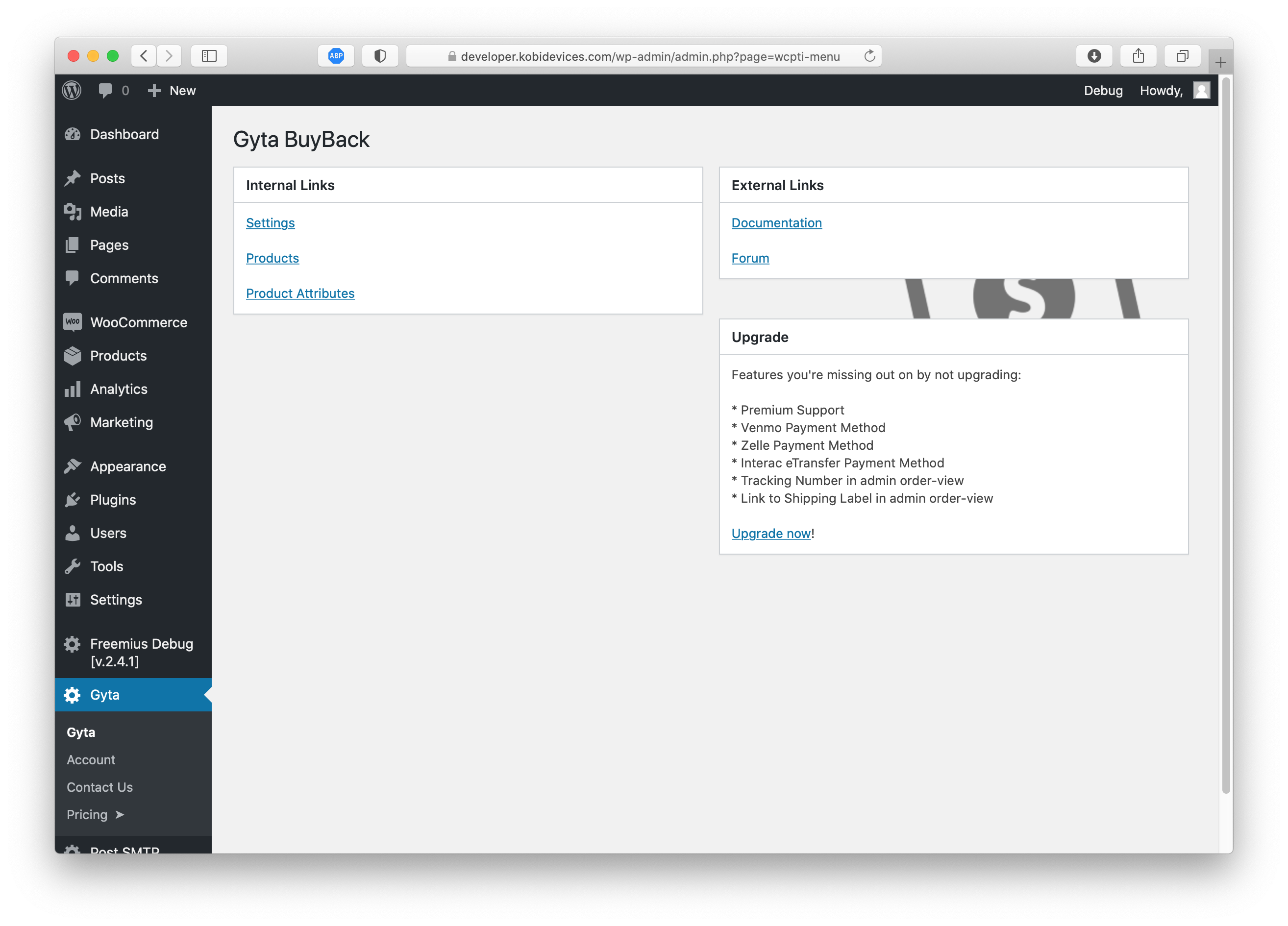
Dashboard page showing links to handy items. 
A portion of the settings page. 
Modified order-view page showing relevant buyback information.
Installation
Minimum Requirements
- WordPress 5.0 or later
- WooCommerce 7.0 or later
- PHP 8.0 or later
Automatic Installation
- Log in to your WordPress admin dashboard.
- Navigate to Plugins Add New.
- Search for “Gyta BuyBack”.
- Click Install Now, then Activate.
- Go to WooCommerce Settings Gyta BuyBack to configure the plugin.
Manual Installation
- Download the plugin zip file from WordPress.org or gytabuyback.com.
- In your WordPress admin, go to Plugins Add New Upload Plugin.
- Upload the zip file and click Install Now.
- Activate the plugin and navigate to WooCommerce Settings Gyta BuyBack.
Quick Start
- Configure your business address under the Gyta BuyBack settings tab.
- Add your EasyPost API key to enable automatic shipping label generation.
- Enable the reversed payment gateways you’d like to offer (Check, PayPal, Zelle, etc.) under WooCommerce Settings Payments.
- Create your buyback products as normal WooCommerce products with the prices you’re willing to pay.
- Start accepting trade-ins!
FAQ
-
Does this plugin require WooCommerce?
-
Yes. Gyta BuyBack extends WooCommerce and requires it to be installed and activated. It is compatible with WooCommerce 7.0 and later.
-
How do the reversed payment methods work?
-
Instead of collecting money from the customer, Gyta BuyBack’s payment gateways record that you owe the customer. The order is placed and you fulfill payment to the customer offline through the selected method (Check, PayPal, Zelle, Venmo, etc.).
-
Do I need an EasyPost account?
-
An EasyPost account is recommended but not required. Without it, you can still use the reversed payment methods and manage orders — you just won’t get automated shipping label generation. EasyPost offers a free tier with pay-per-label pricing. Sign up at easypost.com.
-
What shipping carriers are supported?
-
Through EasyPost, you can generate labels for USPS, UPS, FedEx, and many other carriers. Gyta BuyBack automatically selects the cheapest rate or lets you choose.
-
Is this compatible with WooCommerce HPOS (High-Performance Order Storage)?
-
Yes. Gyta BuyBack fully supports WooCommerce HPOS / Custom Order Tables and the block-based cart and checkout.
-
Can I use this on a WordPress multisite?
-
Yes. The plugin supports both network-wide and per-site activation on WordPress multisite installations.
-
Yes! You can start a 30-day free trial of the premium version directly from within the plugin. Learn more
-
Where can I find documentation?
-
Full documentation, setup guides, and developer references are available at gytabuyback.com/docs.
-
Where can I get support?
-
Free users can post in the WordPress.org support forum. Premium users get access to priority support through gytabuyback.com.
-
Can I suggest a feature or report a bug?
-
Absolutely! Reach out via the support forum or contact us through gytabuyback.com.
Reviews


Contributors & Developers
“Gyta BuyBack | WooCommerce Product Trade-In and Buy Back System” is open source software. The following people have contributed to this plugin.
Contributors


Translate “Gyta BuyBack | WooCommerce Product Trade-In and Buy Back System” into your language.
Interested in development?
Browse the code, check out the SVN repository, or subscribe to the development log by RSS.
Changelog
1.5.0
- Major improvements.
View the complete version history here:
https://gytabuyback.com/version-history/