

Description
WPBot Automator is a powerful automation plugin that brings visual workflow building to WordPress. Create sophisticated automations without writing a single line of code using our intuitive drag-and-drop interface.
Key Features
- Visual Workflow Builder – Drag-and-drop interface for creating automation workflows
- No-Code Solution – Build complex automations without any programming knowledge
- Multiple Triggers – WordPress actions, WooCommerce events, form submissions, and more
- Powerful Actions – Create users, send emails, update posts, manage products, and more
- Conditional Logic – Add filters and conditions to control workflow execution
- Real-time Testing – Test your workflows before activating them
- Workflow Management – Organize, activate, deactivate, and duplicate workflows easily
Supported Integrations
WordPress Core:
* User registration and management
* Post creation and updates
* Comment moderation
* Custom post types
WooCommerce:
* Order creation and status changes
* Product updates
* Customer management
* Cart and checkout events
WPForms:
* Form submission triggers
* Field data mapping
* Conditional form processing
Webhooks:
* Incoming webhook triggers
* Outgoing webhook actions
* Custom headers and parameters
Use Cases
- Automatically create user accounts when WooCommerce orders are completed
- Send welcome emails when new users register
- Update product inventory based on form submissions
- Trigger external services via webhooks when specific events occur
- Create posts automatically from form submissions
- Manage user roles based on purchase history
Premium Features (Coming Soon)
- Advanced conditional logic
- Multi-step workflows
- Scheduled automations
- Additional integrations
- Priority support
Support
For support, please visit https://www.wpbot.pro/
Privacy Policy
WPBot Automator does not collect or store any personal data from your website visitors. All workflow data is stored locally in your WordPress database.
Screenshots
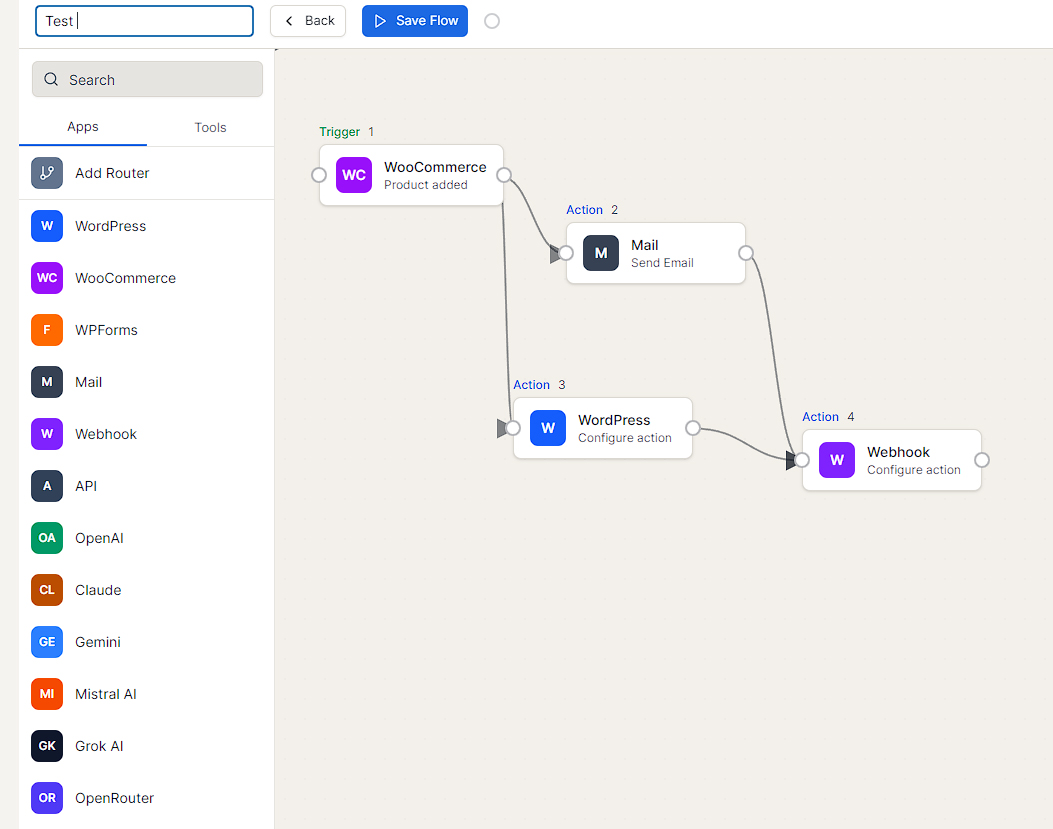
Visual workflow builder interface
Installation
- Upload the
wpbot-automatorfolder to the/wp-content/plugins/directory - Activate the plugin through the ‘Plugins’ menu in WordPress
- Navigate to ‘WPBot Automator’ in the WordPress admin menu
- Start creating your first workflow!
Minimum Requirements
- WordPress 5.8 or greater
- PHP version 7.4 or greater
- MySQL version 5.6 or greater
FAQ
-
Do I need coding knowledge to use WPBot Automator?
-
No! WPBot Automator is designed as a no-code solution. The visual workflow builder allows you to create complex automations using a simple drag-and-drop interface.
-
What triggers are available?
-
WPBot Automator supports various triggers including WordPress user registration, WooCommerce order events, WPForms submissions, and incoming webhooks. More triggers are being added regularly.
-
Can I test workflows before activating them?
-
Yes! The workflow builder includes a testing feature that allows you to verify your automation logic before making it live.
-
Is WPBot Automator compatible with my theme?
-
Yes! WPBot Automator works independently of your theme and is compatible with all WordPress themes.
-
Can I use WPBot Automator with other plugins?
-
Absolutely! WPBot Automator is designed to integrate with popular plugins like WooCommerce and WPForms, and more integrations are planned.
-
How many workflows can I create?
-
There is no limit to the number of workflows you can create with WPBot Automator.
Reviews
There are no reviews for this plugin.
Contributors & Developers
“WPBot Automator – Automation for WordPress Visual No-Code WorkFlow Builder” is open source software. The following people have contributed to this plugin.
Contributors
Interested in development?
Browse the code, check out the SVN repository, or subscribe to the development log by RSS.
Changelog
1.1.0
- Added templates modal
- Added integration with WPForms
- Added integration with contact form 7
- Added integration with FluentCRM
- Added integration with MailRefine
- Added integration with Google Sheets
- Added integration with Meta ads
- Added integration with Google ads
- Added integration with WhatsApp Cloud API
1.0.0
- Initial release
- Visual workflow builder with drag-and-drop interface
- WordPress triggers: User registration, post creation
- WooCommerce triggers: Order created, order status changed
- WPForms trigger: Form submission
- Webhook trigger: Incoming webhooks
- Actions: Create user, send email, create post, update product
- Webhook action: Send HTTP requests
- Workflow management: Create, edit, activate, deactivate, duplicate, delete
- Real-time workflow testing
- Conditional logic support