
Description
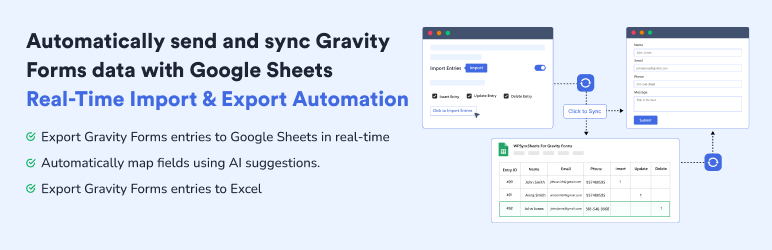
WPSyncSheets For Gravity Forms – Send Gravity Forms entries to Google Sheets in real-time with zero manual effort. Automatically map fields using AI suggestions, auto-create sheets, and keep data synced for reporting, analysis, or backups without worrying about any loss of Gravity Forms entries data.
Gravity Forms Google Sheets Connector is bridge between WordPress plugin Gravity Forms and Google Sheets. This plugin allows you to map Gravity Forms fields to specific spreadsheet columns, create spreadsheets automatically, and keep your data always up to date. Whether you’re backing up submissions, managing form data, or sharing it with your team, this plugin makes the process fast, seamless, and scalable.
This plugin connect Google Sheets directly with Gravity Forms to automatically send entry values to Google Sheets. Gravity Forms entries to Google Sheets connection easily done without requiring any additional software or monthly fees, and with solid security and performance.
Demo | Sample Sheets | Docs | Support | Pro
WPSyncSheets For Gravity Forms Features
-
Export Gravity Forms Entries to Google Sheets
WPSyncSheets For Gravity Forms plugin automatically export gravity forms entries and eleminated your manual data work time. It also secure Google Sheets connector and can store data like name, email, IP address, page URL, and submission date & time. Data is synced instantly using secure Google authentication, and no Google account or Drive data is stored by the plugin author. -
Update Gravity Forms Entries from Google Sheets – Pro
Once the plugin exports Gravity Forms entries to Google Sheets, you can also update the entries from Google Sheets back to Gravity Forms. This helps you fix missing entry data, rename existing data, or add new entry data directly within Gravity Forms. It means the import gravity forms entries from google sheets feature helps keep your Gravity Forms data up to date. -
Gravity Forms Export Entries to Excel
Exporting Gravity form data to Excel is a smart step for simplifying your workflow. And, also for growing your business smoothly. Manually exporting entries each time can be time-consuming. Automating the process with WPSyncSheets saves time and reduces errors. -
Connect Gravity Forms to Google Sheets
Using Gravity Forms alone leaves you relying on its built-in entry list or manual CSV exports. If you want to collaborate, share leads with a team, analyze signups, or build reports, Excel-style CSVs aren’t enough. With Google Sheets, your form entries become instantly accessible. WPSyncSheets For Gravity Forms makes that connection seamless, without any manual CSV exports, coding, or fuss.
Upgrade to Pro Features
✅ All the features in the free plugin (entries export, create new google sheet, etc)
✅ Bulk Export Gravity Forms entries
✅ Export entries with date range option
✅ Import entries form Google Sheets to Gravity Forms
✅ Bulk Import Gravity Forms entries
✅ Schedule automatic imports of data from Google Sheets
✅ Schedule automatic export of data from Gravity Forms
✅ Conditional logic option for export the specific gravity forms entries
✅ Duplicate Feeds option for each Gravity Forms
✅ Payment Status option for paid/approved form entries based on the payment method
✅ Compatibility with WooCommerce Gravity Forms Product Add-Ons
✅ Compatibility with Gravity PDF
✅ Compatibility with Gravity View
✅ Compatibility with RedSys & Bizum Gateway for Gravity Forms
✅ Compatibility with Gravity Forms Survey Add-On
✅ Compatibility with Gravity Forms Stripe Add-On
✅ Compatibility with Gravity Forms Mollie Add-On
✅ Compatibility with Gravity Forms PayPal Checkout Add-On
✅ Compatibility with Gravity Forms Dropbox Add-On
✅ Compatibility with Gravity Forms Nested Forms
✅ Compatibility with Gravity Form Razorpay Add-On
How to Export Gravity Forms Entries?
You can check out the user guide to easily setup the plugin or watch the below video on GSheetConnector For Gravity Forms
How to update Gravity Forms Entries from Google Sheets? (Pro)
Related Import-Export Google Sheets Plugins
WPSyncSheets connects WordPress and WooCommerce platforms with Google Sheets. Our mission is to help businesses automate data transfer, simplify operations, and reduce repetitive tasks through real-time, two-way data synchronization.
🔸 WPSyncSheets For WooCommerce: Import Export WooCommerce Orders, Products, Customers & Coupons.
🔸 WPSyncSheets For Elementor: Map & Sync Elementor Form Entries to Google Sheets in Real Time.
🔸 WPSyncSheets For Core: Import, Export & Bulk Edit WordPress Posts and Pages via Google Sheets.
🔸 WPSyncSheets For Document Library Pro: Sync Document Library Pro documents with Google Sheets.
🔸 WPSyncSheets For Contact Form 7: Send your Contact Form 7 data directly to your Google Sheets spreadsheet and save to database.
🔸 WPSyncSheets For WPForms: Map & Sync WPForms Entries to Google Sheets.
🔸 WPSyncSheets For Ninja Forms: Automatically Sync Ninja Form Entries to Google Sheets.
🔸 WPSyncSheets For Fluent Forms: Sync Fluent Form Entries to Google Sheets in Real Time.
🔸 WPSyncSheets For Formidable Forms: Automatically Map and Sync Formidable Form Entries to Google Sheets.
Screenshots

Gravity Forms Google Sheets Connector 
Gravity Forms Google Sheets API settings configuration 
Save Gravity Forms Entries to Google Spreadsheet 
Connect Gravity Form to Google Sheets feed settings 
WPSyncSheets For Gravity Forms feed settings 
Connect Google Sheets directly with Gravity Forms 
Export Gravity Forms to Google Spreadsheet entries
Installation
- Upload the entire
wpsyncsheets-gravity-formsfolder to the/wp-content/plugins/directory. - Activate the plugin through the Plugins screen (Plugins > Installed Plugins).
You will find WPSyncSheets Lite For Gravity Forms menu in your WordPress admin screen.
For basic usage, have a look at the plugin’s Documentation.
FAQ
-
What does WPSyncSheets For Gravity Forms do?
-
It automatically exports Gravity Forms entries to Google Sheets in real-time. Each submission is instantly added as a new row in your selected spreadsheet — no manual export required.
-
Do I need coding skills to use this plugin?
-
No. The plugin includes an easy-to-use interface with field mapping, auto spreadsheet creation, and real-time syncing — no coding needed.
-
Can I choose which Gravity Forms fields to export?
-
Yes. You can map only the fields you want to export using the plugin’s column mapping feature.
-
Will the plugin create a Google Sheet for me automatically?
-
Yes, during feed setup, the plugin can automatically create a new spreadsheet and sheet tab.
-
Is the sync real-time or scheduled?
-
The free version supports real-time (run-time) syncing. Form entries are sent to Google Sheets immediately after submission.
-
Can I export old Gravity Forms entries to Google Sheets?
-
The Lite version exports new entries. For bulk export of existing/old entries, upgrade to the Pro version.
-
Does this plugin support importing entries from Google Sheets?
-
Import and bulk import functionality is available in the Pro version. It allows importing entries from Google Sheets back into Gravity Forms.
-
Is this plugin compatible with other Gravity Forms addons?
-
Yes. The plugin is compatible with Gravity PDF, Gravity View, Gravity Forms Survey Add-On, WooCommerce Gravity Forms Product Add-On, Stripe, PayPal, Mollie, Razorpay, Dropbox, and more (via Pro version).
-
Can I use this with multiple Gravity Forms?
-
Yes. You can create and configure separate feed settings for each form individually.
-
How do I connect my Google Sheets account?
-
You need to generate a Google API Client ID, Client Secret, and Access Token via Google Cloud Console and add them to the plugin settings. Detailed instructions are available in the plugin documentation: https://docs.wpsyncsheets.com/wpssg-introduction/
Reviews


Contributors & Developers
“WPSyncSheets For Gravity Forms – Connect Gravity Forms to Google Sheets” is open source software. The following people have contributed to this plugin.
Contributors

Interested in development?
Browse the code, check out the SVN repository, or subscribe to the development log by RSS.
Changelog
1.7.3 – Thursday, 26th March 2026
- Changed: Applied WordPress Coding Standards (PHPCS) across the plugin for improved code quality.
- Improved: Enhanced overall code readability and consistency for better maintainability.
1.7.2 – Tuesday, 17th March 2026
- Changed: Updated plugin text domain from
wpssgtowpsyncsheets-gravity-formsto match the plugin slug. - Changed: Regenerated translation template (.pot) file.
1.7.1
- Added: Form Settings page under plugin settings showing all active WPSyncSheets feeds with status and quick access to Feed Settings.
- Added: AI-powered field mapping suggestions to automatically map Gravity Forms fields.
- Improved: Feed Settings UI/UX for a smoother configuration experience.
- Changed: Updated plugin admin page URL slug from
wpsyncsheets-gravity-formstowpsyncsheets-for-gravity-forms.
1.7.0
- Improved: Initial rendering of Dashboard and API tabs on settings page load.
- Improved: Internal code optimizations for better performance.
- Tested: Compatible with WordPress 6.9.1.
1.6.9.4
- Tested: Compatible with Gravity Forms 2.9.23.3.
- Tested: Compatible with WordPress 6.9.
1.6.9.3
- Added: “Leave a Review” functionality.
1.6.9.2
- Improved: Code optimizations.
1.6.9.1
- Tested: Compatible with Gravity Forms 2.9.17.1.
- Tested: Compatible with WordPress 6.8.2.
1.6.9
- Added: “Upgrade to Pro” link.
1.6.8
- Added: Dashboard tab.
1.6.7
- Added: Feedback form popup.
- Improved: UI/UX changes.
1.6.6
- Improved: Code optimizations.
1.6.5
- Improved: UI/UX changes.
1.6.4
- Tested: Compatible with WordPress 6.8.
1.6.3
- Fixed: Issue related to refresh token handling.
1.6.2
- Security: Added
function_exists()check foris_plugin_active()for improved plugin security.
1.6.1
- Security: Added user capability checks for secure operation execution.
1.6
- Security: Added nonce verification for plugin operations.
1.5.3
- Improved: Code optimizations.
1.5.2
- Tested: Compatible with WordPress 6.7.1.
- Updated: Guzzle library to version 7.9.2.
1.5.1
- Added: New design integration.
- Improved: Code optimizations.
1.5
- Tested: Compatible with WordPress 6.6.1.
- Improved: Code optimizations.
1.4
- Improved: Code optimizations.
1.3
- Added: Submission Date, Form ID, and Form Title headers in spreadsheet.
- Added: Clear Spreadsheet button.
- Improved: Code optimizations.
1.2
- Improved: Code optimizations.
- Security: Coding standards improvements and security patch.
1.1
- Improved: Code optimizations.
- Added: Download Spreadsheet button.
- Improved: Library loading.
- Added: View spreadsheet functionality.
1.0
- Initial release.